Suppliers
Event vendor management software: eight things to check before you buy
Eight things to check in vendor software, a question to ask in each demo, and when a spreadsheet is enough.
Alexis · Co-founder of Squena · October 9, 2026 · 10 min read
In short
Event vendor management software tracks the vendors you hire for your events, from the first quote request to the last payment. Before you buy, check a vendor database you reuse, the needs of each event, quote requests, stages, documents, payments, team rights and what vendors see. A spreadsheet is enough for one event and one person.
This guide is for planners, agencies and in-house teams that hire vendors for their own events: a caterer, an AV crew, a venue, rentals, staffing. It covers the software that tracks those vendors, whether you call it a system, an app or a tool. Most of the first results for this search are product pages from software companies, so this guide is written from the buyer's side.
Here, a vendor is a business you hire and pay. It is not a stallholder who registers for a market or a fair: that is another kind of software, built around stall sales and applications. It is not the tool a vendor uses to run its own business, and it is not a wedding planner for a couple.
Below you will find when a spreadsheet is enough, a grid of eight things to check with a question to ask in each demo, and the paperwork to keep for each vendor. The tools you will meet fall into a few families: event suites with a vendor module, general project tools, no-code builders, custom development and the spreadsheet. We build Squena, an event workspace, so we name no other tool and give you questions instead. Its column is a claim to test.

When a spreadsheet is enough
As a rule of thumb, a spreadsheet is enough while one person runs one event with a dozen vendors or fewer. One row per vendor, with a stage, the amounts and the next date, covers it. Our event vendor list template goes further and adds deposit, balance and paperwork columns. Keep one shared vendor tab and one tab per event, so a vendor's history does not fork across files.
Software starts to pay off when the list no longer fits in one person's head. These are typical signs:
- Two events run at the same time, each with its own quotes.
- A second or third person edits the list, and not everyone should see amounts.
- You hire the same vendors again and want your notes from last time.
- Quotes, contracts and certificates sit in several inboxes and folders.
- A client or a finance team asks for last year's vendor list, and you rebuild it by hand.
The buying grid: eight things to check
Use the table in a demo. Ask the question in the middle column, and ask to see the answer on screen, not on a slide. The last column describes Squena as of October 9, 2026, using its English labels.
| What to check | Question to ask in a demo | What Squena does |
|---|---|---|
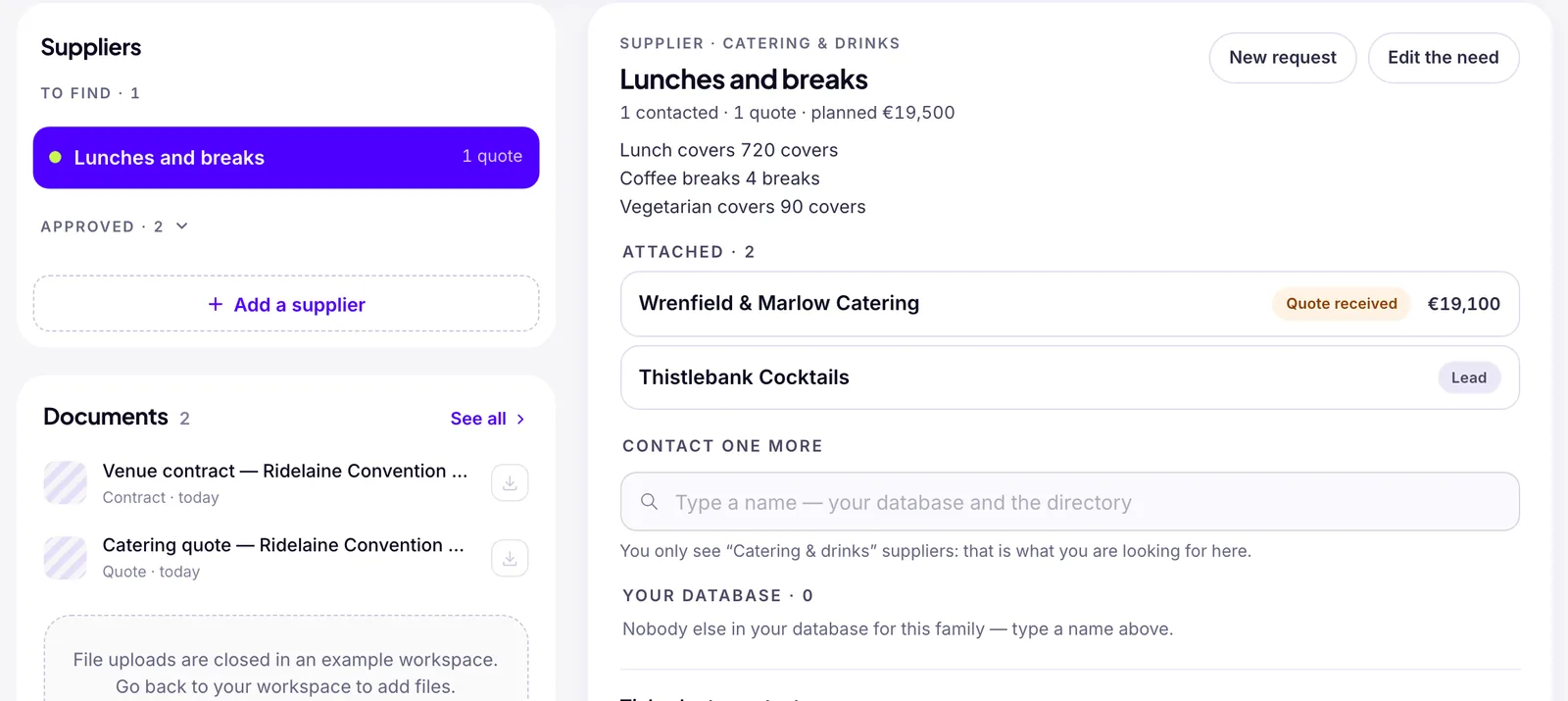
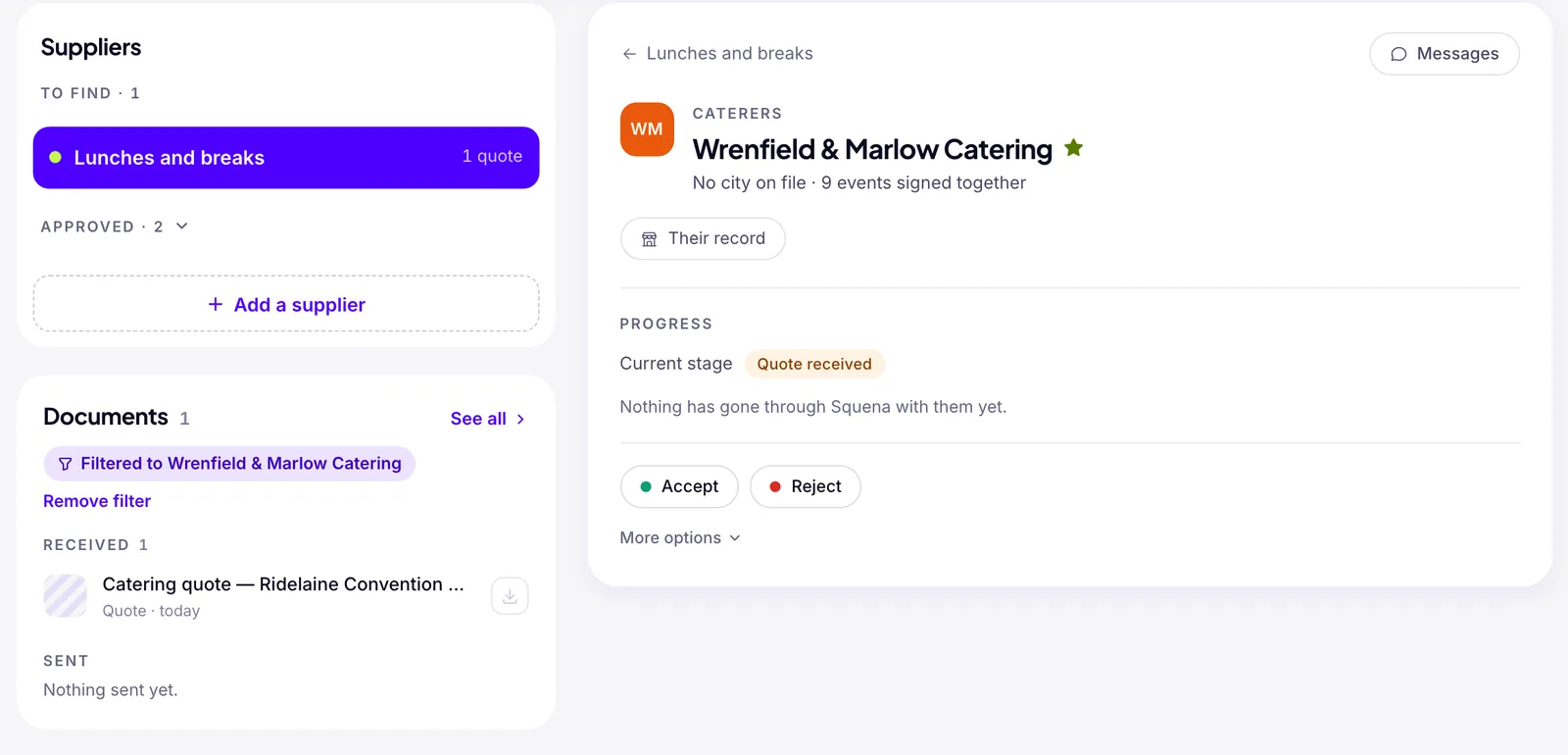
| A vendor database you reuse | Is each vendor one record shared by every event, with notes and a history? Can next year's event start from this year's? | “Suppliers” keeps one record per vendor, with “Internal notes” and an “events signed together” count. “Duplicate” on a past event carries over its needs and suppliers. |
| The needs of each event | Can I list the vendors an event needs before I have names, and see which are still open? | The event page lists “To find” and “Approved,” counting needs with an Approved, Signed or Paid vendor, such as “7 / 11 approved.” |
| Quote requests and comparison | Does one send reach several vendors, one separate email each? How do I compare the answers? | “New request” asks “Who to ask,” “What you need,” “Your message” and “Attachments”: 20 vendors at most, “One email each.” One total per quote. |
| Stages and decisions | Which stages does a vendor go through, who can move it to each, and is every change logged? | Lead, Contacted, Quote received, Approved, Signed, Paid, plus Set aside and Declined. “History” logs each send, reply, stage change and paid amount, with who did it. |
| Contracts and documents | Where do the contract, the insurance certificate and the W-9 live, on the vendor or on the event? Are there end dates and alerts? | “Documents” files quotes, contracts, invoices and certificates under an event, typed from the file name. Vendor files show under “Linked documents.” No end dates, no alerts, no W-9 field. |
| Payments | Can I record a deposit and a balance with due dates, and list what falls due this month? | “Paid” is one running amount, “What has actually gone out: a deposit, then the balance.” A quote can carry “Deposit requested” and “Deposit due by.” No schedule, no reminder. |
| Team access and rights | Can I hide amounts from some people, and separate who chooses a quote, who signs and who marks a payment paid? | “Choose a quote,” “Sign a commitment” and “Mark as paid” are separate rights. By default an “Organiser” cannot mark paid, and a “Volunteer” sees no amounts. |
| What the vendor sees | Does a vendor need an account? What can it see of my other vendors and my budget? | A personal link, no account. The vendor sees the request, and the budget only if you tick “State the planned budget.” It can price and sign its quote, attach files or decline. |
Each row guards against one failure. Without a reusable database, you search for the same caterer again. Without needs per event, a gap shows up when the event is close. Without stages, nobody knows what is committed, and without rights, anyone can commit it. Documents and payments are where the money and the risk sit, and the vendor's view affects whether vendors answer.
Bring your own material to the demo. Take last year's vendor list and three real quotes for one need, and ask the seller to enter them live. Score each row yes, partly or no, and write down what the seller had to explain. Count a feature on the roadmap, or a report the seller builds for you, as a no. Our guides to comparing vendor quotes and to negotiating with event vendors cover what comes after.
In a spreadsheet, the first, second, fourth, fifth and sixth rows become columns, a tab per event and links to a shared folder. The rest is harder. Answers mostly arrive by email and get retyped, a shared file shows every amount to anyone with access unless you hide or protect cells, and vendors rarely work inside your file.
Squena's “projected” budget is what is committed plus every quote still pending (“Quote received” or “Approved”), one amount per vendor, so you set aside the vendors you drop. A vendor's typed amount reaches the budget only when your team enters it under “Quote received” or accepts the signed quote.
Tax forms for U.S. vendors: the W-9 and the 1099
In the United States, a business or nonprofit reports what it pays a non-employee for services from $2,000 a year for payments made after 2025. The same threshold now applies to backup withholding. Under 26 U.S.C. § 3406(b)(6), withholding reaches a payment for services only once your payments to that vendor reach that threshold, or if you had to report or withhold the year before. Payments to corporations, including an LLC taxed as a C or S corporation, are generally excluded. Rents, such as space or machine rentals, go on Form 1099-MISC, also from $2,000, except space rent paid to a real estate agent or property manager. Merchandise is reportable on neither form, but materials supplied incidentally to a service count with the service.
A payer must withhold 24% of a reportable payment when the payee has given no taxpayer ID. What you can take from it: ask for a W-9 before you pay a vendor you may have to report. Our event vendor list template has a tax-form column for this. Squena has no W-9 field and no yearly total per vendor.
Insurance certificates: evidence of coverage, not the policy
In Maryland, a certificate of insurance “is not a policy of insurance” and does not “amend, alter, or extend” its coverage. The Insurance Code says so for property and casualty insurance on risks located in that state. What you can take from it: file the certificate, and track the end date of the policy period it shows. Our event vendor list template has a certificate column, and a booked vendor without one turns amber.
Squena has no end-date field. It guesses a document's type from the file name, mostly with French words, so “certificate-of-insurance.pdf” stays a plain “Document” for good.
Four questions outside the grid
Four more questions change the decision, whatever the tool does with vendors.
- What is the price based on: seats, events, vendors or messages? A per-seat price grows when seasonal staff need access, so ask for the total at your team size.
- Can you take your vendor data out in a standard format, and what happens to it if you stop paying? A vendor database is years of work, so ask for a sample export before you sign.
- Where is your data stored, and who at the seller can read it? Ask to see the privacy policy.
- Who answers when something breaks the week of an event, and during which hours?
Where Squena stops
From Squena's screens, code, pricing page and terms, as of October 9, 2026.
- Amounts are in euros, even in the English interface. There is no dollar option.
- Moving a vendor to “Signed” needs its “SIRET” field filled in (the French company number, 14 digits when added by hand) and an email or phone. No U.S. tax ID field exists: ask how Squena handles U.S. vendors.
- No guest registration, ticketing or stall applications: an event holds a headcount, not an attendee list.
- Vendor import takes a CSV file with five fields: name, field of expertise, email, phone, and address or city. It refuses more than 2,000 rows.
- It never chases a vendor by itself: after five days of silence, its assistant Clara flags “No reply,” and you resend the request.
- A quote request link lasts 14 days at most, less if the event starts sooner.
- No self-service export yet: on request, all your data is sent within 72 business hours.
- Every team member takes a seat, volunteers included: Pro includes three, then charges per person.
- The free plan allows one active event and two people; free or new workspaces can write to 30 people a day.
Frequently asked questions
What is event vendor management software?
It is software that tracks the vendors an organizer hires for events: a reusable database, the vendors each event needs, quote requests and answers, stages from first contact to final payment, contracts and certificates, payments, and who on the team can approve or pay. It is different from vendor registration software, which collects applications from stallholders for a market or a fair.
Do I need software, or is a spreadsheet enough?
As a rule of thumb, a spreadsheet is enough for one event, one person and about a dozen vendors. Software starts to pay off when two events run at once, when more than one person edits the list, when you reuse vendors across events, or when quotes, contracts and certificates are scattered across inboxes.
Do I need a W-9 from every event vendor?
Not necessarily, and this answer applies to U.S. payers only. For services paid after December 31, 2025, the IRS reporting threshold is $2,000 a year per payee, and payments to corporations are generally excluded. Ask for a W-9 before you pay a vendor you may have to report, and ask your accountant which vendors those are.
What should I ask to see in a demo?
Ask to see five things on screen: a vendor reused on a second event, a need with three quotes, who can sign and who can mark a payment paid, what a vendor sees on its link, and a deposit with its due date. A tool that answers with a slide has not answered.
What does Squena not do?
Squena does not handle guest registration, ticketing or stall applications. Amounts are in euros, signing a vendor needs a filled-in SIRET field, and it has no W-9 field.
Sources
- About Form W-9, Request for Taxpayer Identification Number and Certification (page reviewed June 27, 2026; United States) — Internal Revenue Service (IRS)
- Instructions for the Requester of Form W-9 (current revision; backup withholding at 24%) — Internal Revenue Service (IRS)
- Form 1099-NEC and independent contractors (page reviewed September 24, 2026; threshold of $2,000 for payments made after December 31, 2025) — Internal Revenue Service (IRS)
- Instructions for Forms 1099-MISC and 1099-NEC (page reviewed July 1, 2026; threshold, rents, goods and backup withholding) — Internal Revenue Service (IRS)
- 26 U.S. Code § 3406, backup withholding (subsection (b)(6), as amended by Public Law 119-21; United States) — Legal Information Institute, Cornell Law School
- Insurance Code § 19-116, certificates of insurance (2026 session edition; Maryland) — Maryland General Assembly