Suppliers
Event vendor list template: every vendor, status and paper
One sheet for every vendor on an event: who they are, what is booked, what is paid, and which papers are missing.
Alexis · Co-founder of Squena · October 1, 2026 · 9 min read
In short
An event vendor list is one sheet that holds every vendor on an event: who they are, what they do, where the contract and the payments stand, and which papers you still lack. Keep one row per vendor, one status from first quote to final payment, and a check for the insurance certificate and the tax form. Then reuse the list for the next event, and keep the vendors who delivered.
Search for an event vendor list template and some of the first results are built for weddings. This page is written for people who run corporate events, association events and festivals. You often hire a dozen vendors or more, you pay them in stages, and your finance team asks for the paperwork. Here, a vendor is a business you hire and pay, not one that sells at your event.
A good event planner vendor list answers one question at a glance: what is still open with each vendor? Without it, the answer sits in inboxes, in a contract folder and in someone's memory. This guide covers the list, the paperwork to hold for each vendor, the categories that are easy to forget, and how to reuse it. Comparing quotes and writing the brief have their own guides: the vendor quote comparison template and the scope of work template.

What the list holds, column by column
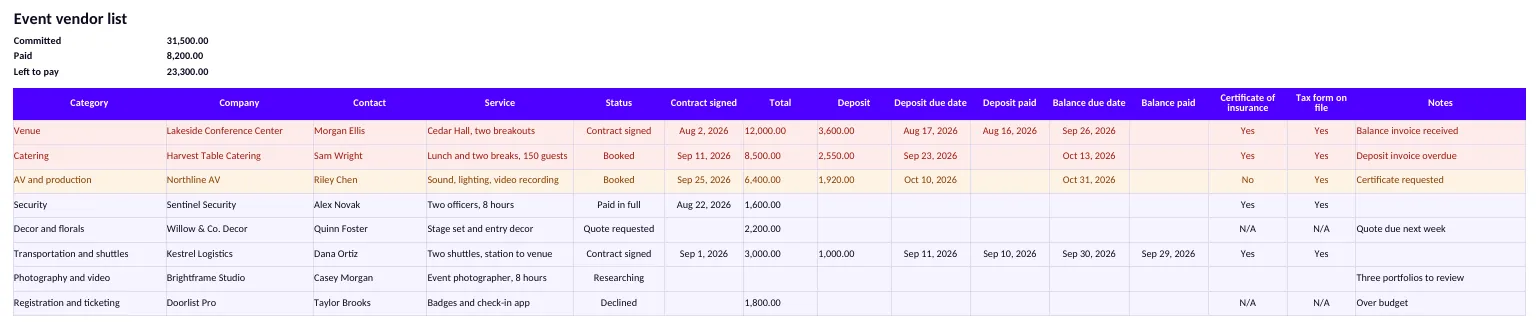
Start with the plain facts: category, company, contact, phone, email, and the service in one line. Add a status. Then add the money: the total, the deposit, the date each payment is due and the date it was paid. Close with the paperwork and the day-of details.
| Group | Columns | What it answers |
|---|---|---|
| Who | Category, company, contact, phone, email | Who do I call? |
| What | Service, notes | What did we buy, and what was agreed? |
| Where it stands | Status, contract signed | Is this a lead or a commitment? |
| Money | Total, deposit, deposit due date, deposit paid, balance due date, balance paid | What do I owe this week, and to whom? |
| Paperwork | Certificate of insurance, tax form on file | Can this vendor start work, and can I pay them? |
| On the day | Arrival or load-in, on-site contact | Who shows up, when, and who meets them? |
ClickUp's generic template stops earlier. On its own blog, ClickUp describes it as holding name and contact information, custom fields for service quality and supplies type, and a status. The page is dated February 5, 2025. The statuses are new, ongoing, complete or disengaged. That suits a supplier you buy from all year. An event list also needs dates, because a deposit due on a Friday is easy to miss.
Give every vendor one status
Six statuses are enough: Researching, Quote requested, Booked, Contract signed, Paid in full and Declined. Keep Declined rows instead of deleting them. A vendor who said no this year may say yes next year, and the row remembers why.
Use each word the same way across the team. Booked means you said yes and the vendor accepted. Contract signed means both signatures exist. The totals at the top count Booked, Contract signed and Paid in full as committed money, so a vendor who is still at Quote requested never inflates your commitments. Left to pay is committed minus paid.
Choosing between quotes happens in the comparison, not here. When you pick a winner, move that vendor to Booked and mark the others Declined. Payment terms and a vendor questionnaire deserve their own pages. The list only records what you agreed.
The paperwork to hold before the event
Two columns carry the paperwork: the certificate of insurance and the tax form. The contract has its own date column. The tax part of this section applies to the United States, so replace that column with whatever your finance team asks for if you work elsewhere.
For context, in Great Britain the Health and Safety Executive tells event organizers that they have prime responsibility for the health and safety of their workers, the public and contractors. That covers the contractors working for them at the event. The page says nothing about insurance or tax forms. These papers are one way to show you looked at who you hired.
The certificate of insurance
A certificate of insurance, or COI, is a document from a vendor's insurer that shows the coverage the vendor holds. Whether you need one depends on the venue, the contract and the vendor. Look at what two public venues ask. The Las Vegas Convention and Visitors Authority writes that a permit for exhibitor-appointed contractors requires a certificate of insurance (general/auto liability and workers' compensation). It adds that the company name on the application must exactly match the insured name on the COI.
The Seattle Convention Center asks the organizer, as licensee, for general liability coverage of no less than $1,000,000 per occurrence. The certificate is due at least 45 days before the event (version of March 3, 2025). Its rules and regulations also ask the service companies of exhibitors for a business license and a $1,000,000 certificate, at least ten days before move-in. These are the rules of those two venues, not a general rule. Ask your venue for its list before you ask your vendors for certificates.
Then record the answer. Set the column to Yes when the certificate is in your file, N/A when none is needed, and No until you hold it. A vendor who is booked or signed and still marked No turns amber, so the gap shows before the vendor arrives.
The tax form (W-9 and Form 1099-NEC, United States)
The IRS requires a business to report payments made during the calendar year, in the course of that business, to a person who is not an employee, for services. The threshold is $2,000 for payments made after December 31, 2025. It was $600 before, and the IRS says it may be adjusted for inflation beginning in 2027. The report is Form 1099-NEC, and the instructions say to furnish it and file it by January 31.
The rule has limits. Payments to a corporation, including an LLC taxed as a C or S corporation, are generally not reported, with exceptions. Personal payments are not reportable. Payments made by credit card, and some third-party network payments, are reported by the payment processor on Form 1099-K, not by you on Form 1099-NEC. Rent for space or equipment goes on Form 1099-MISC. Payments to nonresident alien entertainers follow other rules (Form 1042-S): ask your accountant.
Nonprofit organizations, however, are considered to be engaged in a trade or business, so a nonprofit that pays a freelancer $2,000 or more in a year is covered by the rule.
To report, you need the vendor's taxpayer identification number. The IRS says to use Form W-9 to provide your correct TIN to the person who must file an information return. The instructions add that people who have not furnished their TINs are subject to backup withholding on payments that must be reported. In practice, ask each new vendor for a W-9 before the first payment, and set Tax form on file to Yes. Whether a given vendor is reportable is a question for your accountant.
Check the categories before you start
The surest way to forget a vendor is to build the list from the vendors you already know. Start from categories instead. The Categories sheet of the template lists 22, grouped here by what they do for the event.
| Group | Categories |
|---|---|
| Space and structure | Venue; rentals (furniture, tents, linens); lighting and staging; power and generators; decor and florals |
| Food and drink | Catering; bar and beverage |
| Program and media | AV and production; entertainment and talent; photography and video; printing and signage |
| People and safety | Security; medical and first aid; event staffing; registration and ticketing; parking and valet |
| Travel | Transportation and shuttles; accommodation |
| Site services and admin | Restrooms and sanitation; cleaning and waste; permits and insurance; other |
On the Categories sheet, mark each one Yes, No or Not sure for your event. A Yes with no vendor listed turns red. A Yes with vendors listed but none booked turns amber. A Yes with at least one vendor booked, signed or paid turns green. The red rows are the categories where you have not started to look for a vendor.
Reuse the list from one event to the next
Save a clean copy of the file with the company, contact and service columns filled in, and the status, money and paperwork columns empty. For the next event, copy it, set each status back to Researching and clear the dates. Vendors who delivered stay on the list, with a note on what to ask them first.
One habit keeps the copy honest. A certificate covers a period, so treat an old Yes as a question, and ask again. Keep the finished event's file, with its payments, in your records.
Where Squena fits
In Squena, your suppliers live in one database, with categories, folders and a search by name or city. You can import a list saved as a CSV file from Excel or Google Sheets. Squena reads five columns, name, field of expertise, email, phone and address or city, and shows what it will create before it writes anything. The template's statuses, amounts and papers stay in your sheet. On an event, the Suppliers column shows what is still To find and what is Approved, and each supplier carries a stage from Lead to Paid.
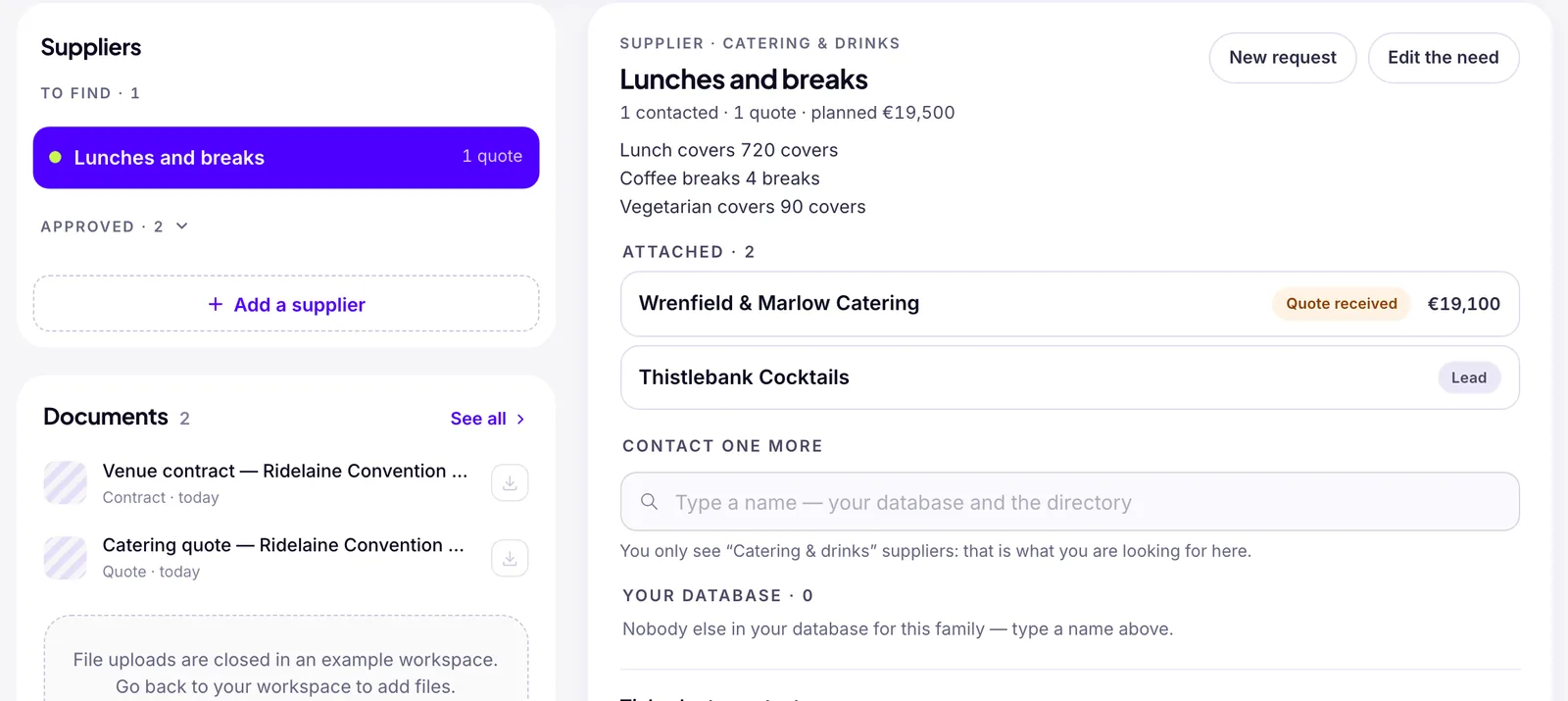
Once a supplier is Signed, a team member with the Mark as paid permission can enter its Paid amount, a deposit and then the balance. With budget access, it feeds the budget breakdown. Amounts are in euros. Two limits. Squena has no field that tracks, vendor by vendor, whether you hold a certificate of insurance or a tax form. A Technical supplier's record has one free-text line, Public liability insurance, and nothing checks it. Squena keeps no due dates, only the amount paid. A file you drop under an event is typed from French words in its name, such as contrat, attestation or assurance. So venue contract.pdf and insurance certificate.pdf are both filed as Document. Squena does not remind a vendor on its own about a missing paper, so keep the checklist in your spreadsheet.
Frequently asked questions
What should an event vendor list include?
One row per vendor with the category, company, contact, phone and email, the service and a status. Add the total, the deposit and balance with their due and paid dates, the certificate of insurance, the tax form, the arrival time and an on-site contact.
What is the difference between a vendor list and a vendor quote comparison?
A quote comparison helps you choose between vendors for one need. A vendor list tracks every vendor on the event from the first quote to the final payment: status, contract, payments and paperwork. Compare first, then mark the winner Booked on the list and the others Declined.
Do I need a certificate of insurance from every event vendor?
Not by a single rule. It depends on the venue, your contract and the vendor. Venues publish their own requirements, and some ask the organizer for a certificate too. Ask your venue first, then decide vendor by vendor and record the answer: Yes, No or N/A.
Do I need a W-9 from event vendors?
In the United States, a business that pays a non-employee $2,000 or more in a year for services, for payments made after December 31, 2025, generally reports it on Form 1099-NEC, and asks for a W-9 to get the vendor's taxpayer identification number. Payments to corporations are generally excluded. Check with your accountant.
How do I reuse a vendor list for the next event?
Keep a clean copy with the company, contact and service columns filled in. For a new event, copy it, set every status back to Researching and clear the dates and amounts. Keep the vendors who delivered, with a note, and ask again for any certificate that has expired.
Sources
- Instructions for Forms 1099-MISC and 1099-NEC — who must file, corporations, nonprofits, January 31 — Internal Revenue Service (US)
- Form 1099-NEC and independent contractors — the $2,000 threshold after December 31, 2025 — Internal Revenue Service (US)
- About Form W-9, Request for Taxpayer Identification Number and Certification — Internal Revenue Service (US)
- Contractor Permit Application for Las Vegas Convention Center — certificate of insurance — Las Vegas Convention and Visitors Authority
- Event Services insurance requirements (March 3, 2025) — Seattle Convention Center
- Rules and Regulations, section 17, Service Companies — Seattle Convention Center
- Event safety: are you a...? The event organizer's responsibilities — Health and Safety Executive (UK)
- 10 free vendor list templates (February 5, 2025, for context) — ClickUp (the company's own blog, for context)