Production
The event production schedule template that survives week three
A schedule template built backwards from show day, with the deadlines a vendor or a license will not move for you.
Alexis · Co-founder of Squena · September 3, 2026 · updated October 5, 2026 · 12 min read
In short
An event production schedule template works backwards from the day the doors open, placing each department's tasks against the deadlines that cannot move. It only holds if every task that depends on a vendor carries two dates — when you send, and when you must have it back — and if statutory deadlines, like a licensing notice, are treated as fixed, not as guesses. Its short version, an event planning timeline, lists milestones in weeks before the event day, and those weeks differ by format.
Woodstock 50 announced itself in January 2019, with an anniversary lineup meant to bridge generations: Jay-Z, Santana, Miley Cyrus. Tickets were due to go on sale by the end of that month. They missed that date, missed the lineup reveal planned for February, and missed a second ticket date in April. On April 29, the festival's investor withdrew its funding and the event was canceled.
That is an extreme case, but the mechanism is not rare. A production schedule fails less often because a task was late, and more often because nobody wrote down which dates could not move. Most schedule templates you can download do not help. They are built by spreadsheet companies, not by people who have run a show — a row is just a row, not a license or a vendor's lead time.
Why a schedule template dies in three weeks
The natural instinct is to start from today and move forward: this week you call venues, next week you request quotes, then you choose. That is a to-do list, not a schedule. Nothing in it has a deadline that comes from outside itself.
A production schedule does the opposite. It starts from the day the doors open and works backwards, department by department. Every task then inherits a latest date instead of a preferred one, and a slip becomes visible straight away: it either eats a buffer or moves a milestone.

Building an event production schedule template, department by department
A schedule holds when its deadlines come from the event, not from the spreadsheet. Group the plan by department — venue, production, marketing, box office, licensing and safety, catering — and give each one the single date it cannot miss.
An irreversible milestone is a moment after which going back costs money, not time. Once the venue is signed, the deposit is gone if you cancel. Once tickets go on sale, refunds cost more than the ticket. That is the test: can this be undone by working harder, or only by paying for it?
Placed first, those six or seven irreversible dates cut the calendar into stretches that everything else fits inside.
| Workstream | Milestone | What becomes irreversible | Cost of going back |
|---|---|---|---|
| Venue | Venue signed | The date and the capacity | Deposit lost, for example 30%, negotiated case by case |
| Production | Technical purchase order | The stage plan and the power draw | Supplier cancellation fees |
| Marketing | The program, the signage, the names | A full reprint | |
| Box office | Ticketing opens | The price and the announced capacity | Refunds, and your reputation |
| Licensing and safety | Licensing notice served | The declared safety arrangements | Restart the process, statutory wait |
| Catering | Catering ordered | The number of covers | Billed on the forecast, not the turnout |
Notice what is missing: choose the caterer, approve the artwork, brief the team. Those are tasks. They move without breaking anything, as long as they stay ahead of the milestone they feed.
The deadlines that do not move
Some of those dates are not yours to negotiate — and not every event qualifies for the easy route. In England and Wales, a Temporary Event Notice only covers small events: under 500 people at all times, including staff, for no more than 168 hours, or seven days. Within those limits, a Temporary Event Notice must be served at least ten clear working days before the event. Clear means it excludes both the day the council receives it and the day of the event itself.
A premises license is a different process, not a shorter countdown to the same finish line. GOV.UK puts it plainly: you'll need a premises licence if you want to sell alcohol or offer entertainment. That covers live music, recorded music, dance, even an indoor sporting event. The application notice has to stay displayed at the venue for 28 days. Most premises licenses run indefinitely, so an established venue is likely to hold one already, not applying fresh for your one event.
None of these deadlines are paperwork bolted onto the real plan — they are the plan. The Purple Guide, the UK's guide to running events safely, is written by the industry for the industry. That is a reminder: a license chased at the last minute costs more than one written down early.
How far ahead, by format
These are orders of magnitude for a first pass, not a guarantee. HSE's own guidance says planning should be proportionate to the scale of the event and the degree of risk — bigger and riskier means more time, not more paperwork. What follows just stops you starting too late, which remains the most common and most expensive mistake.
| Format | First milestone | Technical lock | |
|---|---|---|---|
| Conference, 100 to 300 people | 3 to 4 months ahead | 6 weeks | 3 weeks |
| Convention, 300 to 1,500 people | 8 to 12 months ahead | 3 months | 6 weeks |
| Festival, several stages | 10 to 14 months ahead | 4 months | 8 weeks |
| Client evening, 50 to 150 people | 6 to 10 weeks ahead | 3 weeks | 10 days |
| Trade show with exhibitors | 10 to 12 months ahead | 3 months | 6 weeks |
An event planning timeline for each type of event
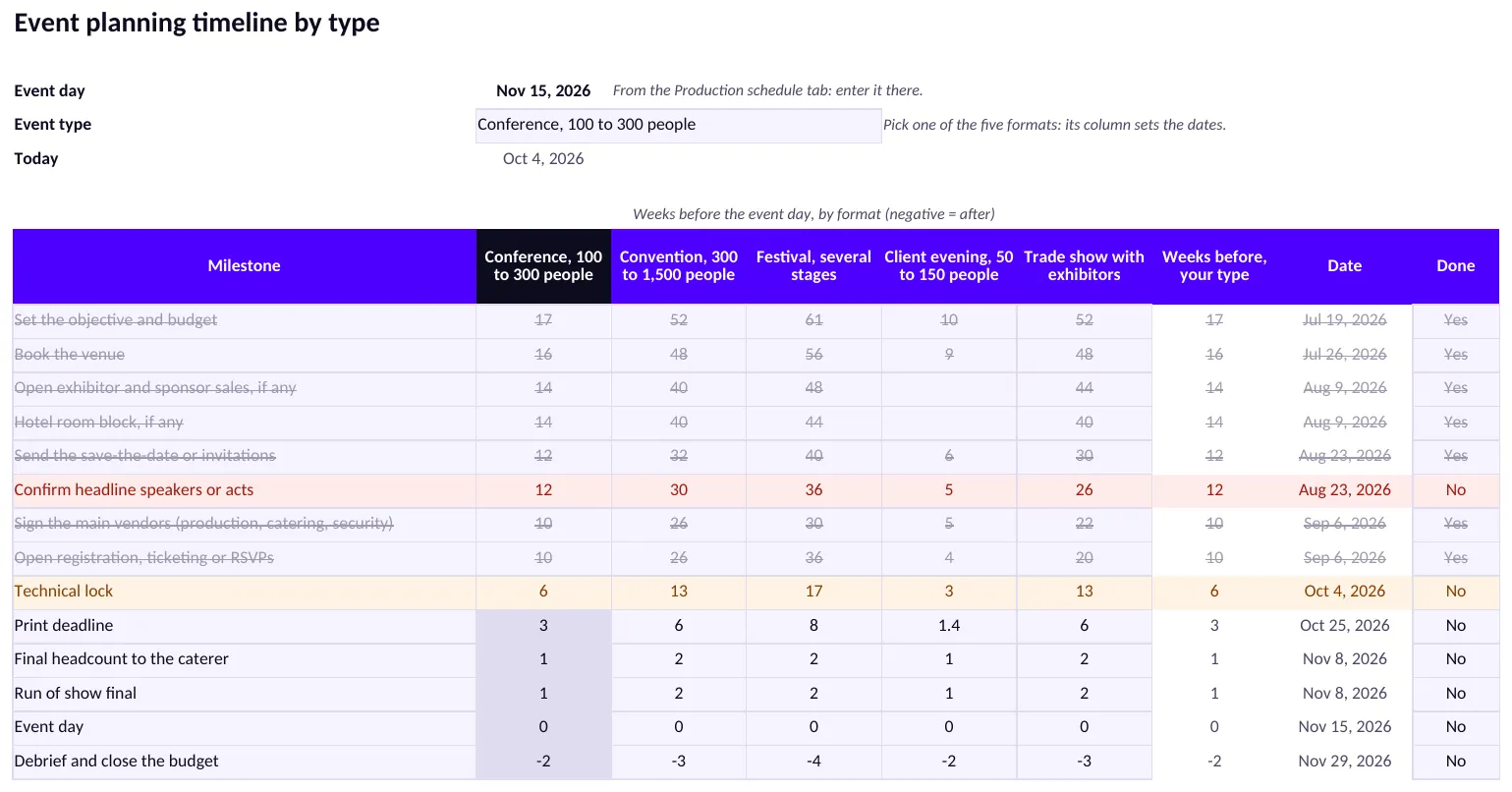
A production schedule runs to dozens of tasks. Here, an event planning timeline is its short version: a list of milestones, each counted in weeks before the event day. The Timeline by type tab of the template is that version: an event planning timeline template with fourteen milestones. They run from setting the objective and budget to closing the budget after the debrief.
You enter the event day once, on the Production schedule tab. On the new tab, you pick one of five formats, the same five as in the table above. Each milestone then shows its weeks before the event day and its date, which is the event day minus those weeks. A negative number puts a milestone after the event day, as for the debrief.
A worked example: a conference of 100 to 300 people
Take a conference of 100 to 300 people on November 15, 2026. The date is an example, the one in the preview above. Here is what the tab gives for six of its fourteen milestones.
| Milestone | Weeks before | Date | Where the weeks come from |
|---|---|---|---|
| Set the objective and budget | 17 | July 19, 2026 | Top of the first-milestone range in the table above |
| Book the venue | 16 | July 26, 2026 | Starting value |
| Technical lock | 6 | October 4, 2026 | The table above |
| Print deadline | 3 | October 25, 2026 | The table above |
| Final headcount to the caterer | 1 | November 8, 2026 | Starting value |
| Debrief and close the budget | 2 after | November 29, 2026 | Starting value |
Only three rows come from the table above, itself a rough guide. The first milestone sits at the top of its range, four months, which the tab rounds to 17 weeks. The technical lock and the print deadline copy the table as it stands. The other weeks are starting values written for the template. They are not sourced, and they are not a standard.
In the preview, today is October 4, 2026. “Confirm headline speakers or acts” is red: its date, August 23, has passed and Done is not Yes. “Technical lock” is amber: its date is today, and anything due within 14 days turns amber.
Why the weeks change with the format
Cvent, an event software vendor, published a planning timeline dated April 22, 2024. It places “Appoint your chosen venue” at 6 to 9 months out. It adds that a timeline can start earlier or later, “depending on factors such as the number of expected attendees” or the length of the event.
The University of Montana's Conference and Event Services publishes a suggested timeline for events associated with the university. It puts “Reserve a venue” at 6 to 8 weeks before the event.
What you can take from it: the two guides do not describe quite the same step. Cvent's “Appoint your chosen venue” follows an RFP to shortlisted venues. Montana's “Reserve a venue” links to the university's own campus rooms, and the page adds that large annual or special events can book rooms well in advance. So the tab's weeks are starting points. Replace them with your own, from past editions or from what the venue and suppliers quote.
Anchors, blanks and your own rows
Cvent also calls some dates “anchor points,” meaning “deadlines that are set in stone,” and its examples include catering numbers and print deadlines. What you can take from it: three rows of the tab are anchors in that sense, the technical lock, the print deadline and the final headcount to the caterer. Place them first, then fit the rest around them.
Some milestones do not apply to every format. A blank cell makes the tab show n/a: in the starting values, a client evening has no exhibitor sales and no room block. Six empty rows at the bottom take your own, such as a licensing notice. Marking a row Done grays it out, strikes it through and ends its red or amber.
The tab does not link to the 35 tasks. It tracks the decisions, and the Production schedule tab tracks the work. The two tabs also use separate example numbers: Define the event objective sits 180 days out on the Production schedule tab, against 17 weeks for a conference on this one.
What a task needs before it can move
A task that drags is almost always a badly written task. Four things are enough, and rarely more than one is missing.
- An action verb and a single object. « Caterer » is not a task; « choose the caterer from the three quotes » is.
- A named person. Not a team — a team does not feel late.
- A latest date, inherited from the milestone that follows it, not picked by feel.
- What is blocking it, if anything. A task that is waiting and does not say for what is an invisible task.
The fourth point is the one people skip. It is also the one that changes the weekly review: instead of going through every task, you look only at the ones waiting on something.
Why the spreadsheet eventually gives out
A schedule in a spreadsheet works well — up to three conditions, and all three eventually arrive.
- When a milestone moves, nothing follows. You shift everything that depends on it by hand, and you always miss one.
- When two people open it, the reference version disappears. The file is soon called SCHEDULE_v4_final_REAL.
- When you want to know what is committed, the plan and the budget do not talk. The signed quote lives in someone's mailbox.
This is not an argument against spreadsheets. It is the moment the tool changes job. As long as the schedule fits in a column of dates, keep it. The day it has to connect to vendors, quotes and the committed budget, a column of dates is no longer the right shape.
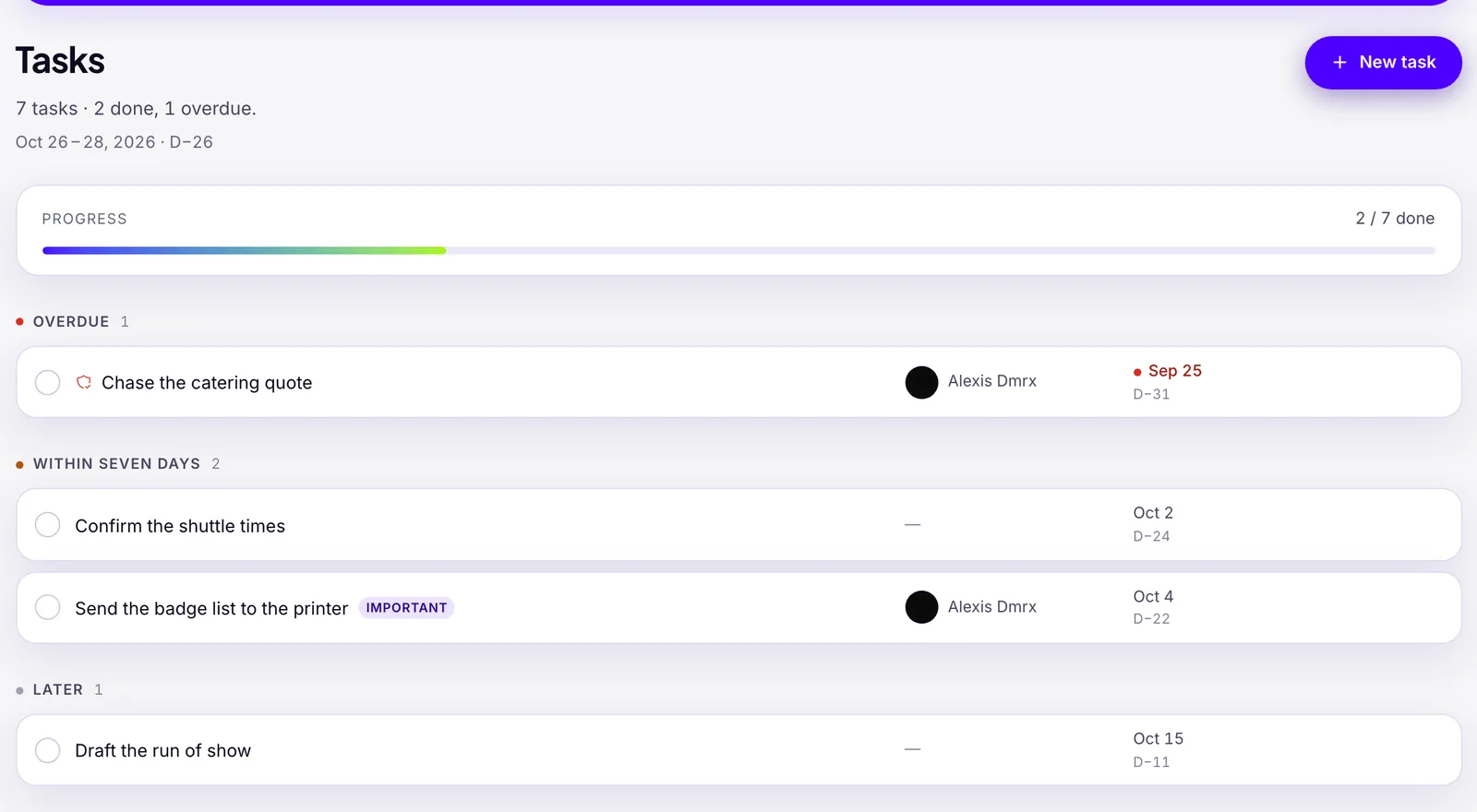
Squena keeps that schedule inside the event, next to its supplier records and committed budget. No switching between a spreadsheet and a mailbox to find who still owes you a quote. Each task shows how many days it sits before the event, next to its date. What it will not do: if a milestone slips, it will not move every dependent task for you — you still redate them by hand.
The weekly review that replaces twenty follow-ups
A schedule does not need updating every day. It needs a fixed, short appointment, always in the same order.
- What was due this week and is not done. Nothing else first.
- What has been waiting on a vendor longer than the planned lead time. That is where the real delays hide.
- The next irreversible milestone, and what has to close before it.
- What has moved in the committed budget since last week.
Twenty minutes is enough, and the order matters. Starting with the week's wins makes for good morale and a bad review.
The part almost nobody does
The day after the event, the team is exhausted and the schedule gets archived. That is exactly when it is worth the most.
Three questions, written down while it is fresh: which lead time turned out wrong, which milestone was placed too late, and which vendor delivered what they promised. Those three answers are worth more than any template — including this one.
It is also why a schedule is better off living next to the supplier database. A note that says « this one returned their quote in three days » is only useful if you can find it again next year, on their record.
Frequently asked questions
What should an event production schedule template include?
Six or seven irreversible milestones come first — venue signed, technical order placed, print, ticketing, licensing, catering. Every other task is dated backwards from them, with a named owner. Anything that depends on a vendor also carries two dates: when you send it, and when you must have it back.
How far in advance should I start an event production schedule?
Three to four months for a conference of 100 to 300 people, eight to twelve months for a convention, and ten to fourteen for a festival with several stages. Starting too late is the costliest mistake, because the milestones you cannot move sit furthest out.
What's the difference between a production schedule and a run of show?
A production schedule covers the weeks or months before the event and answers 'what has to happen, by when, for whom.' A run of show covers the day itself, minute by minute. Most events need both, but they are different documents with different owners.
Can I use a generic spreadsheet template for event production?
Yes, until a milestone moves and nothing downstream follows, two people open the file and the reference version splits, or you need to know what is committed and the schedule does not talk to the budget. Until then, a spreadsheet is enough.
What happens if I miss a licensing deadline like a Temporary Event Notice?
In England and Wales, a Temporary Event Notice needs at least ten clear working days before the event. Miss it and the notice cannot cover your event — you restart the process or drop the licensable activity, on a clock you no longer control.
What is an event planning timeline?
An event planning timeline lists what has to happen before an event, counted back from the event day. Some guides list every task, period by period. The one in this template is short: fourteen milestones, in weeks before the event day, from setting the objective and budget to the debrief. A production schedule goes further, with dozens of tasks, owners and vendors.
Does an event planning timeline change with the type of event?
Yes. Cvent, an event software vendor, says a planning timeline may start earlier or later “depending on factors such as the number of expected attendees” or how many days the event runs. In this template, each of five formats has its own column of weeks. Only three rows copy the article's table of lead times by format; the rest are starting values to adjust, not a standard.
Sources
- Temporary Event Notice — at least 10 clear working days' notice — GOV.UK
- Premises licence — required to sell alcohol or offer entertainment — GOV.UK
- Running an event safely — getting started — Health and Safety Executive (UK)
- The Purple Guide to Health, Safety and Welfare at Events — Events Industry Forum
- Woodstock 50 canceled by its investors — Colorado Public Radio (NPR)
- The Ultimate Event Planning Timeline Guide (+ Template) (April 22, 2024, for context) — Cvent (event software vendor)
- Event Planning Checklist: suggested timeline for events associated with the university (undated, for context) — University of Montana, Conference and Event Services