Production
Conference planning checklist: what a conference adds, with a template
Speakers, rooms, sponsors, AV, access and follow-up: what a conference adds to an event checklist, and a sheet that dates every task.
Alexis · Co-founder of Squena · October 3, 2026 · 18 min read
In short
A conference planning checklist lists every task of a multi-session event, each with a date counted back from the event day. Beyond the tasks any event shares, it covers what a conference adds: speakers and a call for papers, a program across rooms, registration, sponsors, AV for each room, accessibility and the follow-up. Published lead times differ, so treat dates as your own choices. The Excel template below calculates them from your event date.
Search for a conference planning checklist and page 1 mixes several kinds of pages. Ex Ordo and i4a are software companies, Visit Denver is a convention and visitors bureau, and the University of Washington Tacoma publishes the timeline of its events office. Other results are template pages and downloadable files.
Their timelines start far apart. Ex Ordo says an academic conference usually takes 12 to 14 months to organize. The i4a list for association events starts 12 months out. The Tacoma list starts at six months or more, and says some conferences might be on a shorter timeline. Visit Denver lists 20 steps and gives no lead times.
This guide is for whoever organizes a conference: several sessions, speakers who are chosen or invited, a program that runs across rooms, and often sponsors or exhibitors. It adds what those pages leave open, and each fact comes with its source, its date and who it applies to. The sheet below works out the dates from yours. Venue and hotel terms stay short here. The event RFP template covers the request you send to venues and hotels, and the run of show template covers the days themselves.
The file downloads without a form. Type the event name and date on the Checklist sheet and every due date fills in. Then give each task an owner, and change the tasks and weeks to match your event.

How the sheet works
The sheet gives each task a due date: the event date minus the weeks in the Weeks before column. Weeks are whole numbers. A negative number places a task after the event, so -2 means two weeks after. The sheet therefore cannot hold a deadline of two days after the event. For that, use 0 and write the real deadline in Notes.
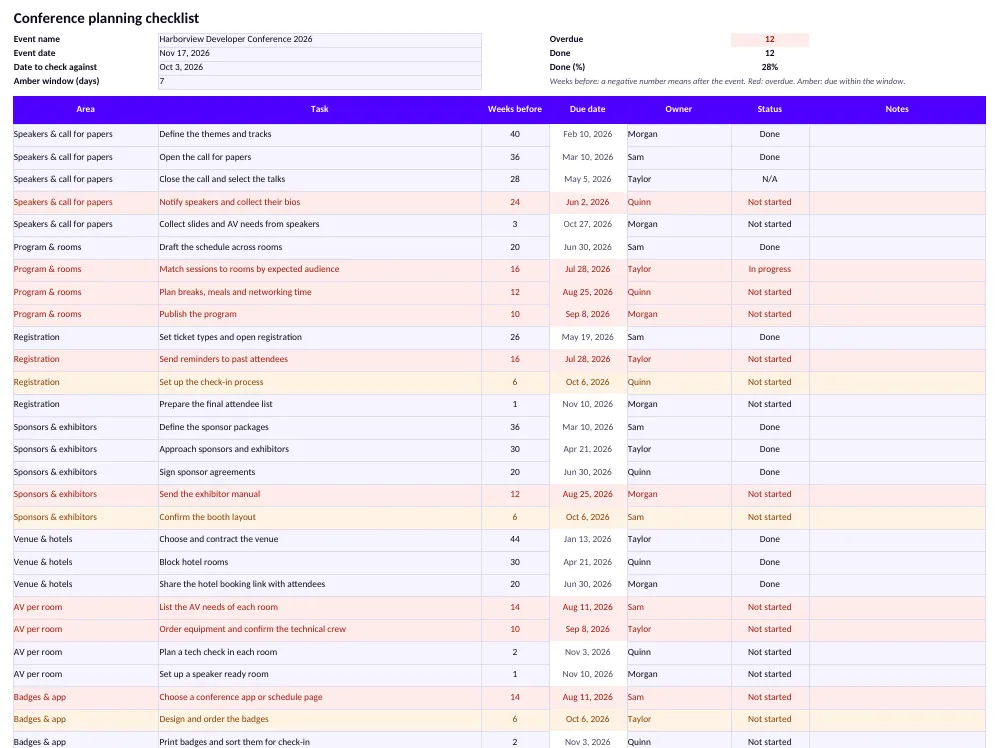
Two colors do the watching: red for overdue, amber for due soon. A task marked Done or N/A turns neither. Date to check against starts as today, so type another date to see where you would stand then.
The sheet suggests dates. It does not know your venue, your review process or your sponsors. Change any Weeks before value and the due date follows.
Speakers and the call for papers
Speakers depend on people outside your team: you invite or select them, then wait for their slides. An unsigned PCMA article of March 1, 2017 describes the call for speakers and sessions as a tool that associations widely use to crowdsource the education content of their annual conferences. The sample has five tasks here, from defining themes and tracks at 40 weeks to collecting slides and AV needs at 3.
Timing is where sources differ. The same article cites a 2013 survey of 120 associations by Velvet Chainsaw Consulting and Tagoras. It says about 62 percent close off submissions eight months or more before the conference, without saying out of how many. Ex Ordo, which sells software for academic conferences, puts the call for papers at eight to nine months before. The sample opens its call at 36 weeks, about eight months out, and closes it at 28.
For most conferences, the call for sessions or speakers should not open any sooner than seven months before the event.
PCMA, 7 Ways to a Better Call for Content, March 1, 2017 (unsigned)
What you can take from it: the page is unsigned. A Velvet Chainsaw Consulting blog post of April 12, 2017 repeats the same seven tips and says it adapts Dave Lutz's Forward Thinking column in PCMA's Convene. So the seven months are one consultant's advice, and the page gives no data for them. The survey the article cites is that firm's own, and it shows when calls closed, not how long they ran. Pick your dates by how long your review takes, then count back from the day you must publish the program.
The same article lists review practices: mask each speaker's name and company, and cap each volunteer reviewer at 25 submissions. These are suggestions, not rules.
Speaker agreements and slides
Put each speaker's duties in writing. ASAE hosts a sample speaker agreement on its site. It is an unsigned PDF for a not-for-profit corporation. No author is named in the text, and the file properties say 2018. Treat it as an example, not as an ASAE standard. In it, the speaker agrees to meet program deadlines for slides, handouts and AV requests. The speaker also agrees to join two rehearsal or prep sessions and to provide a copy of the presentation for session video. Finally, the speaker states that they have obtained the licenses and permissions for any third-party music, video or other media shown. Have a lawyer adapt a sample like this to your event. Settle the rights to slides and recordings there, not after the event.
Slides come last, so set their date by what you must do with them. The Mid-Atlantic ADA Center and TransCen publish an accessible meetings guide, an online edition from 2015 of a 1993 guide. It tells presenters to deliver materials by the requested deadline. Its reason is that preparing materials to meet the needs of attendees "can take two to three weeks," so a late file leaves no time. For printed handouts converted for people who are blind or have low vision, the guide gives a longer figure: up to 30 days. The sample asks for slides at 3 weeks, the top of the first range, so ask earlier for handouts. The guide also asks for a plain typeface without serifs, at least 22 point, and captioned videos, and says to brief presenters well in advance.
Program and rooms
A conference is built by the room and the hour. The sample drafts the schedule across rooms at 20 weeks, matches sessions to rooms by expected audience at 16, plans breaks, meals and networking at 12, and publishes the program at 10. It contracts the venue at 44 weeks, so you sign for rooms before the program exists.
MPI Media wrote on June 15, 2026 that suppliers need a realistic picture of how the event flows, even when every session is not final. Many teams send a draft run of show or a simplified timing grid. What you can take from it: send an estimate of your breakout rooms early, and refine it as the program firms up.
When you match sessions to rooms, leave space for attendees who need more of it. The Mid-Atlantic ADA Center guide recommends that you plan for 30% more space if 10% or more of participants are expected to use mobility aids. It also recommends aisles at least 36 inches wide, and preferably 60. If accessible restrooms are not on the meeting-room floor, it suggests longer breaks between sessions. These are the guide's best-practice recommendations, not the text of the law.
The Events Industry Council's Event Specifications Guide organizes an event by function, meaning any organized occasion that contributes to the event, such as a session or a registration area. Its template was approved on September 30, 2004, when the Council was still named the Convention Industry Council, and updated in June 2005. It says every function must have its own set-up order. The Council lists the template as under review.
Registration and hotels
The sample has four registration tasks: set ticket types and open registration at 26 weeks, remind past attendees at 16, set up check-in at 6, and prepare the final list at 1. Ex Ordo, a software company, says in its post on academic conferences that registration typically opens 7 to 9 months before the event. The sample opens it at 26 weeks, about six months. It also has you block hotel rooms at 30 weeks and share the booking link at 20.
The Events Industry Council's Housing and Registration Accepted Practices, approved on August 10, 2005 when the Council was still named the Convention Industry Council, include a registration form template. Its instructions tell the organizer to describe each fee category and the time frame it applies to, and to say what the fee does not include. The organizer also gives the final registration deadline and says whether on-site registration will be available. The instructions ask for the policy and dates for changes, cancellations and refunds, including how an attendee can be substituted. The template suggests tracking attendee types such as member, speaker, exhibitor and guest. The Council lists this document as under review.
On hotels, the same document says that if housing and registration are handled by separate entities, you should connect them with technology as much as possible. Linking the two sites makes it easier to see who has registered but not booked a room, and the other way around. Ask about access needs on the form too, as the accessibility section explains.
Sponsors and exhibitors
The sample has five tasks here. It defines sponsor packages at 36 weeks, approaches sponsors and exhibitors at 30, and signs agreements at 20. The exhibitor manual goes out at 12, and the booth layout is confirmed at 6.
Dave Lutz, a consultant, wrote in a PCMA article of September 24, 2019 that sponsorship should be organized like a restaurant menu. Items are grouped by what a sponsor wants: education, attendee experiences, VIP experiences, a home base and branding. He calls selling at least 65 percent of available inventory a good target, and advises you not to list items you do not plan to provide unless they are sold. These are one consultant's rules of thumb.
He also lists activation plans of 90 days or longer among his six keys. Ninety days is about 13 weeks, so agreements signed at 20 weeks, as in the sample, leave room for a plan of that length before the event. For exhibitors, the specifications guide has a set-up order written for them, to tell show management and other vendors what their booth needs.
AV, room by room
A conference runs several rooms at once, so AV is a list per room, not one line in the budget. The sample lists the AV needs of each room at 14 weeks, and orders equipment and confirms the technical crew at 10. It plans a tech check in each room at 2 and sets up a speaker ready room at 1.
In the Events Industry Council's template, the AV section sits inside each function's set-up order. For each function you mark whether AV is not required, or provided by the group, by the venue or by an outside vendor. Then you list equipment with quantities, from data projectors to microphones by type. The comments are for lighting and labor needs, such as an AV technician.
At a minimum, an event organizer should send the ESG to all facilities and vendors four weeks prior to the start of the event.
Events Industry Council, APEX Event Specifications Guide Template (approved 2004, updated June 2005)
The guide adds that facilities and vendors should respond with completed orders no later than two weeks before the event. It calls these recommended guidelines, says that each facility's and vendor's needs will vary, and says the contract may override them. What you can take from it: the sample's 14 and 10 weeks come earlier than this floor. The floor dates from 2004 and 2005, and the guide says the timetable depends on the size and complexity of the event. Agree on your own dates with each supplier.
Rehearsal is the other item a conference adds. On managing slides with a remote control or a facilitator, the Mid-Atlantic ADA Center guide says a practice session for each presenter in advance is ideal. The ASAE sample asks speakers to join two rehearsal or prep sessions. The Mid-Atlantic guide also tells presenters to always use the microphone, because hearing aids and assistive listening systems may not pick up their words otherwise.
Accessibility
This section covers the United States, where the Americans with Disabilities Act (ADA) applies. Other countries have their own rules, and this guide does not cover them. It is not legal advice: ask a lawyer which rules apply to your organization and your venue.
ADA.gov, the Department of Justice's site, explains that the ADA has different titles for different kinds of organizations. Title II covers all services, programs and activities of state and local governments, with public education among its examples. Title III covers businesses and nonprofits serving the public, with hotels among its examples, but the same page says religious organizations are exempt from it. Title I covers employment, for employers with 15 or more employees. What you can take from it: a conference run by a state university sits under Title II, and one run by a private business or nonprofit may fall under Title III. Title II has its own regulation, 28 CFR Part 35, which this guide does not cover.
The Title III regulation, 28 CFR Part 36, applies to a private entity that "owns, leases (or leases to), or operates a place of public accommodation," as its definitions put it. Its list of places includes an inn, hotel or motel, and an auditorium, convention center, lecture hall or other place of public gathering. So a privately operated hotel or convention center that hosts your conference is covered. Whether your own organization is covered too depends on what it is and does.
Section 36.303 of that regulation says a covered business must furnish appropriate auxiliary aids and services where necessary to ensure effective communication with individuals with disabilities. Its examples include qualified interpreters on-site or through video remote interpreting, and open and closed captioning, including real-time captioning. The duty has limits: a business can show that a step would fundamentally alter what it offers or would be an undue burden, meaning significant difficulty or expense. The aids must also be provided in accessible formats, in a timely manner.
The venue contract may share some of these duties with you. Section 36.201(b) says that the landlord and the tenant who owns or operates a place of public accommodation are both covered. It adds that a lease or other contract may allocate responsibility between them. Whether that fits a short event rental is a question for a lawyer. The Mid-Atlantic ADA Center and TransCen guide says a venue may require a clause on the group's responsibilities, meaning the organization that contracts with the venue. Its examples include accessible exhibit set-up and certain auxiliary aids, such as alternate-format materials or sign language interpreters. Read that clause before you sign.
| Task in the sample | Weeks before | What a source says |
|---|---|---|
| Check accessible routes and rooms | 16 | The Mid-Atlantic ADA Center guide says to inspect a site yourself and with people with disabilities who bring a user's perspective. |
| Ask attendees about access needs at registration | 14 | The guide's sample question covers material formats, interpreting, CART (real-time captioning), transcripts, assistive listening, mobility devices, service animals and diet. |
| Arrange captioning or interpretation where needed | 8 | The guide recommends at least two interpreters for a meeting of two hours or more, so they can take breaks. |
After the conference
The sample puts the survey at 1 week after the event, thank-yous at 1, slides and recordings at 2, the team debrief at 3, and the report to sponsors at 4.
The Events Industry Council has posted a 2026 edition of its Post-Event Report, on a page dated June 23, 2026. Its instructions say to complete the report within 30 days of event close and to send it to all stakeholders within 14 days of completion. The 2026 edition keeps the nine original sections and adds four, one of them on accessibility and inclusion outcomes. The report reconciles what was contracted with what was delivered. That makes it a different document from a team debrief or a sponsor report. If your sponsor report doubles as the post-event report, the sample's 4 weeks fits inside the 30 days. The earlier edition, approved in 2003 and updated in 2005, said 60 days.
For the survey, ASAE's Associations Now published an article on September 26, 2024 by a content marketing manager at an event software company. It advises sending the survey within 24 to 48 hours after the event, with a reminder a few days later, and keeping it to five to 10 questions. One sample question asks about accessibility features or accommodations that would have improved the experience. Ex Ordo also says 24 to 48 hours. The sample puts the survey one week after, the nearest whole week.
Where Squena fits
In Squena, each event has a Tasks screen. A task has a title, a status (To do, In progress, Done or Blocked), a priority, a due date and one person assigned. Tasks are grouped as Overdue, Within seven days, Later, No due date and Done, and each date shows as D−N, counted from the event's first day.
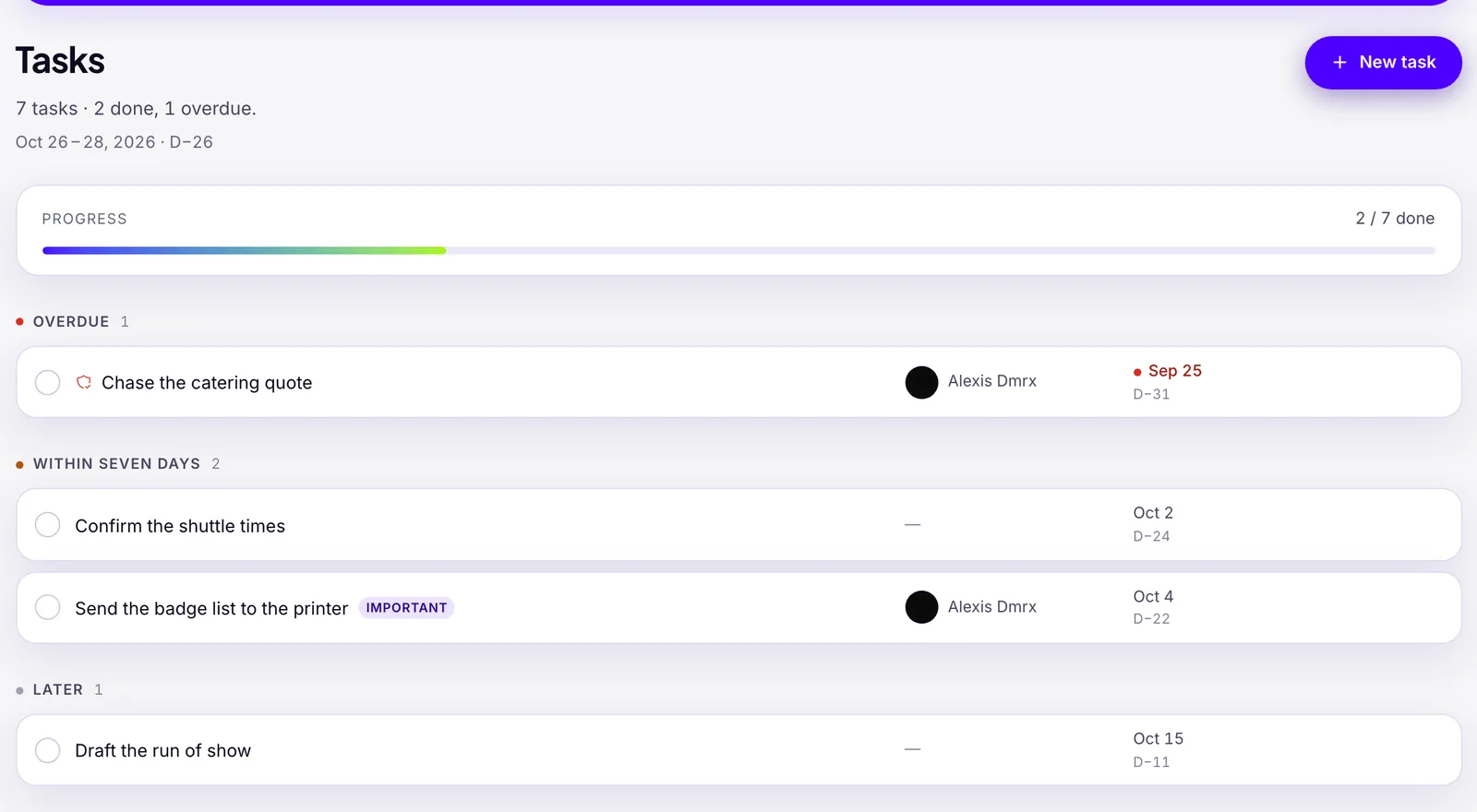
Squena is not a conference platform. It has no call for papers, speaker records, session schedule, registration, badges, sponsor tracking or survey. It does not come with a conference task list: you add tasks one at a time, each with a calendar date and not a number of weeks. The seven-day window is fixed, and a task goes to someone with an account in your workspace. Use the sheet for the dated checklist, or add its tasks to a Conference event in Squena to see what is overdue.
Frequently asked questions
What should a conference planning checklist include?
A conference needs the tasks any event shares. It adds speakers and a call for papers, a program across rooms, registration, sponsors and exhibitors, AV for each room, accessibility, badges, and an after-event report. The template covers these in 44 example tasks across 11 areas.
How far ahead should I start planning a conference?
There is no standard. Ex Ordo says 12 to 14 months for an academic conference, and i4a says 12 months for association events. A university events office says six months or more. Start from your longest lead time, such as the venue, the call for papers or sponsors, and count back from the event date.
Does the ADA apply to my conference?
It depends on who you are. In the United States, Title II covers state and local governments, including public education. Title III covers businesses and nonprofits serving the public, including privately operated hotels and convention centers. Religious organizations are exempt from Title III. Check which applies to your organization, ask a lawyer, and read the accessibility clauses in your venue contract. Other countries have their own rules.
Can I get the conference planning checklist as a PDF?
The download is an Excel file (.xlsx), free and without sign-up. Excel can save a sheet as a PDF. Enter the event date first, so the due dates appear, then save the Checklist sheet when it shows the dates you want to print.
When should I send the post-event survey?
An ASAE Associations Now article of September 26, 2024 advises sending it within 24 to 48 hours after the event, with a reminder a few days later. Ex Ordo says the same. Both authors work for software companies, so treat the timing as advice, not a rule.
Sources
- Introduction to the Americans with Disabilities Act (Titles I, II and III; religious organizations exempt from Title III) — ADA.gov, U.S. Department of Justice, Civil Rights Division
- ADA Title III Regulations, 28 CFR Part 36 (sections 36.104, 36.201 and 36.303) — ADA.gov, U.S. Department of Justice, Civil Rights Division
- ADA Title II Regulations, 28 CFR Part 35 (state and local governments; not covered in this guide) — ADA.gov, U.S. Department of Justice, Civil Rights Division
- Accessible Meetings, Events & Conferences Guide (online edition, 2015, of a 1993 guide; page modified May 21, 2024; not legal advice) — Mid-Atlantic ADA Center and TransCen (part of the ADA National Network)
- APEX Event Specifications Guide Template (approved September 30, 2004, updated June 2005, under review) — Events Industry Council (then Convention Industry Council)
- APEX Housing & Registration Accepted Practices (approved August 10, 2005, under review) — Events Industry Council (then Convention Industry Council)
- Events Industry Council Templates (page headed "Templates Under Review") — Events Industry Council
- APEX Post-Event Report, 2026 edition (interactive form; page dated June 23, 2026) — Events Industry Council
- APEX Post-Event Report Template, earlier edition (approved October 30, 2003, updated August 10, 2005; completion within 60 days) — Events Industry Council (then Convention Industry Council)
- 7 Ways to a Better Call for Content (March 1, 2017, unsigned) — PCMA
- How to Improve Your Call for Presentations Process (April 12, 2017, Dave Lutz; adapted from his column in PCMA's Convene) — Velvet Chainsaw Consulting
- Tips for Developing Bespoke Sponsor Packages for Conferences (Dave Lutz, September 24, 2019) — PCMA
- Essential elements your event RFP template must include to avoid hidden costs (June 15, 2026) — MPI Media
- Speaker Agreement (sample PDF made from a Word file in 2018; no author named in the text) — File hosted by ASAE
- 5 Best Practices for Creating and Sharing Post-Event Surveys (September 26, 2024) — ASAE Associations Now (author at an event software company)
- Free Conference Planning Checklist & Template (January 14, 2026, for context) — Ex Ordo (conference software company)
- 12-Month Checklist for Association Events (updated June 30, 2026, for context) — i4a (association software company)
- Conference Planning Checklist & Timeline (undated, for context) — University of Washington Tacoma, Office of Events & Conferences
- Conference Planning Checklist (20 items, undated, for context) — Visit Denver, the Convention & Visitors Bureau