Budget
An event budget template needs three columns, not two
Two columns show what you have paid. Three show what you have promised, while you can still change it.
Alexis · Co-founder of Squena · September 3, 2026 · updated October 5, 2026 · 10 min read
In short
A good event budget template tracks three states, not two: planned, committed and paid. Committed is what you have promised, a signed quote or a purchase order, even before the money leaves your account, and it is the only figure that moves at the moment you decide. Once quotes are signed, an event budget tracker adds an expense log: one row per invoice or payment, with its due date, paid date and receipt.
When Pemberton Music Festival filed for bankruptcy in May 2017, it allegedly owed creditors US$2.5 million.
The reporting does not say exactly where the budget broke down. What it does show is a festival that kept spending while its finances quietly fell apart, until the gap was too big to close.
That is the risk this piece is about: a budget that only shows what has been paid always catches the overspend too late. The fix is not complicated. It is a third column.
Why a two-column event budget template hides the risk
Most event budget templates have two columns: planned and actual. The trouble is the word actual, because it means invoiced. Four to eight weeks can pass between the day you sign a quote and the day the invoice lands. For all that time, the template shows money you no longer have.
It looks tidy, and it is dangerous. You keep committing money while staring at a balance that ignores what you already committed.
| State | What it means | When it moves | What it lets you do |
|---|---|---|---|
| Planned | Your opening estimate | When you build it, then rarely | Frame the event, trade off between items |
| Committed | A signed quote, a purchase order issued | The moment you sign | React — it is the only state you can act on |
| Paid | The money has left | When the invoice arrives, then when it clears | Track cash, close the books |

Why committed is the number that counts
Once you accept a quote, the money is gone. Not from the bank account — from your room to maneuver. Whether the transfer leaves tomorrow or in two months changes your cash position, not your budget. Tracking commitments does two things that tracking payments cannot.
- The overspend shows up while it can still be recovered: at the moment of committing, not four weeks later.
- Trade-offs become possible. « There is $4,200 left on technical » is a sentence you can decide on. « We have paid $11,000 of $30,000 » is not.
It is also what makes an alert useful. An alert on what is paid always arrives too late. An alert on what is committed arrives at the moment of the decision.
The items every budget template forgets
It is not the big items that derail a budget. Those are priced, negotiated and watched. It is the lines with no owner.
- Get-in and get-out hours outside the normal slot, at premium rates.
- Overnight security between the build and the doors opening.
- Meals and lodging for technical crews and for speakers.
- Consumables: gaffer, batteries, cups, last-minute printing.
- Bank and platform fees on ticketing.
- Making good afterwards, and the deposit that does not come back in full.
- Specific insurance: cancellation, public liability, equipment.
Open a contingency line of 5 to 10% depending on the format. Treat it as a real item, with an owner. Not as a cushion you discover empty in June.
Suppliers do not always use the same words for the same thing. If a quote mentions « attrition » or a « deposit » and the meaning is not clear, the Events Industry Council keeps a reference glossary of about 1,350 terms.
In whole cents, and tax-inclusive or not — but decide
Two technical details cost more than they look. First, a budget is held in whole cents. Floating-point amounts end up producing totals that do not land, and a budget that is wrong by a few cents is a budget nobody trusts any more.
Second, you have to settle whether the budget is tax-inclusive or tax-exclusive, and write it at the top. In the UK the standard rate of VAT is 20%, so a budget that mixes quotes excluding tax with invoices including it drifts by a fifth without a single line being wrong.
Rough splits by format
These ranges are for spotting an anomaly, not for building a budget. They are orders of magnitude, not a survey. Recalibrate them against your own past editions, not a single outside benchmark.
If you run trade shows rather than conferences, CEIR, the research arm of IAEE, publishes its own ongoing work on how the exhibit dollar is spent. It is a second point of reference, built for exhibitions rather than the formats in the table below.
| Item | Conference | Convention | Festival |
|---|---|---|---|
| Venue and utilities | 25 to 35% | 20 to 30% | 10 to 20% |
| Technical (sound, light, video) | 15 to 25% | 15 to 20% | 25 to 35% |
| Catering | 15 to 25% | 20 to 30% | 5 to 15% |
| Program and speakers | 5 to 15% | 10 to 20% | 25 to 40% |
| Communication and signage | 5 to 10% | 5 to 10% | 5 to 10% |
| Safety and first aid | 3 to 6% | 5 to 8% | 8 to 15% |
| Contingency | 5% | 5 to 8% | 8 to 10% |
Tracking the spend once the quotes are signed
Signing a quote does not end the budget work. Invoices arrive, deposits go out, and some receipts never come. The Budget tab holds one row per budget line, grouped by category, which is too coarse to follow all that. An event budget tracker needs a second list: one row per invoice or payment.
The Expense log, an event expense tracking template
In an event budget tracking spreadsheet, that second list is the Expense log tab of the template. Each row holds one invoice or one payment. It takes a date, a vendor, a category picked from the Budget tab, and what the money is for. Then come an invoice or purchase order number, the amount, the due date, the date paid, the payment method, and whether the receipt is filed.
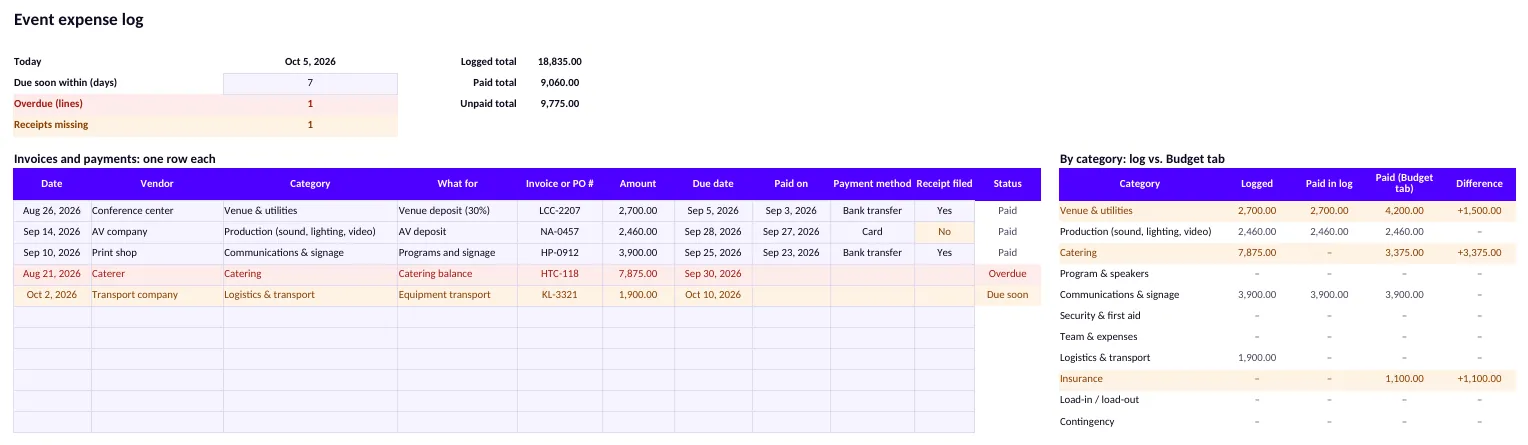
The last column, Status, fills itself. It shows one of five words, and three of them change the color of the row.
| Status | What triggers it | Color |
|---|---|---|
| Paid | The Paid on cell holds a date | None |
| Overdue | No paid date, and the due date is before today | Red |
| Due soon | No paid date, and the due date is today or inside the window set at the top, 7 days to start with | Amber |
| Check date | The due date or the Paid on cell holds text, not a real date | Amber |
| Unpaid | No paid date, and a due date further out, or no due date at all | None |
At the top, the tab totals what is logged, paid and unpaid. It counts the overdue lines, in red when there are any, and the receipts missing, in amber. The due-soon window is a cell you can change, from 0 to 60 days. A receipt counts as missing when a row is paid and Receipt filed is not Yes.
Check the log against the Paid column
The table on the right, By category, sets what the log says was paid against the Paid column of the Budget tab. Difference is the Budget tab minus the log. The row turns amber when it is not zero, and an amber row means one of the two lists is wrong or out of date.
Two limits to know. A row with an amount but no category from the Budget tab turns amber in Category. It stays out of By category, so that table can add up to less than the logged total at the top. And the log has 60 rows: to add more, insert a copied row above the last one, because a row typed below it falls outside every total.
In the preview, whose rows are made up, Venue & utilities shows 4,200.00 paid on the Budget tab and 2,700.00 in the log. Insurance shows 1,100.00 on the Budget tab and nothing in the log. The log never writes into the Budget tab: it only checks it. Matching a row to your bank statement stays a manual step.
What to keep with each row
For United States federal taxes, the IRS describes the paper behind a business expense. Its page lists invoices, paid bills, receipts and canceled checks among the supporting documents. For an expense, they “should identify the payee, the amount paid, proof of payment, the date incurred,” with a description of what was bought.
What you can take from it: the log's columns cover the same ground, with the vendor, the amount, the date, what for, and the date and method of payment. The Receipt filed column says whether the document itself is in your files. For a transfer or a card payment, a bank or card statement can show the payment. For cash, the receipt carries the weight. The log tracks the paper; it does not replace your books or the documents themselves.
How long to keep them depends on the rule that applies to you. For United States federal income tax returns, the IRS says to keep records “until the period of limitations for that tax return runs out,” generally three years from filing. A few situations run longer. The same page adds that “your insurance company or creditors may require you to keep them longer than the IRS does.” Other countries have their own periods.
What makes a budget template reusable next year
An event budget has a second life, and that is where it becomes valuable. But only if it keeps three pieces of information that spreadsheets almost always lose.
- Which supplier sits behind each line. An amount with no name cannot be renegotiated.
- The gap between the original quote and the final invoice, item by item. That is the real multiplier to apply next year.
- What was committed and never used — an item that is systematically underspent is a budget to cut, not a pleasant surprise.
That is why a budget is better off living in the same place as the supplier database. The line « technical — $18,400 » says nothing. The line « technical — $18,400 committed with that supplier, invoiced $19,900 last year » says what to do next time.
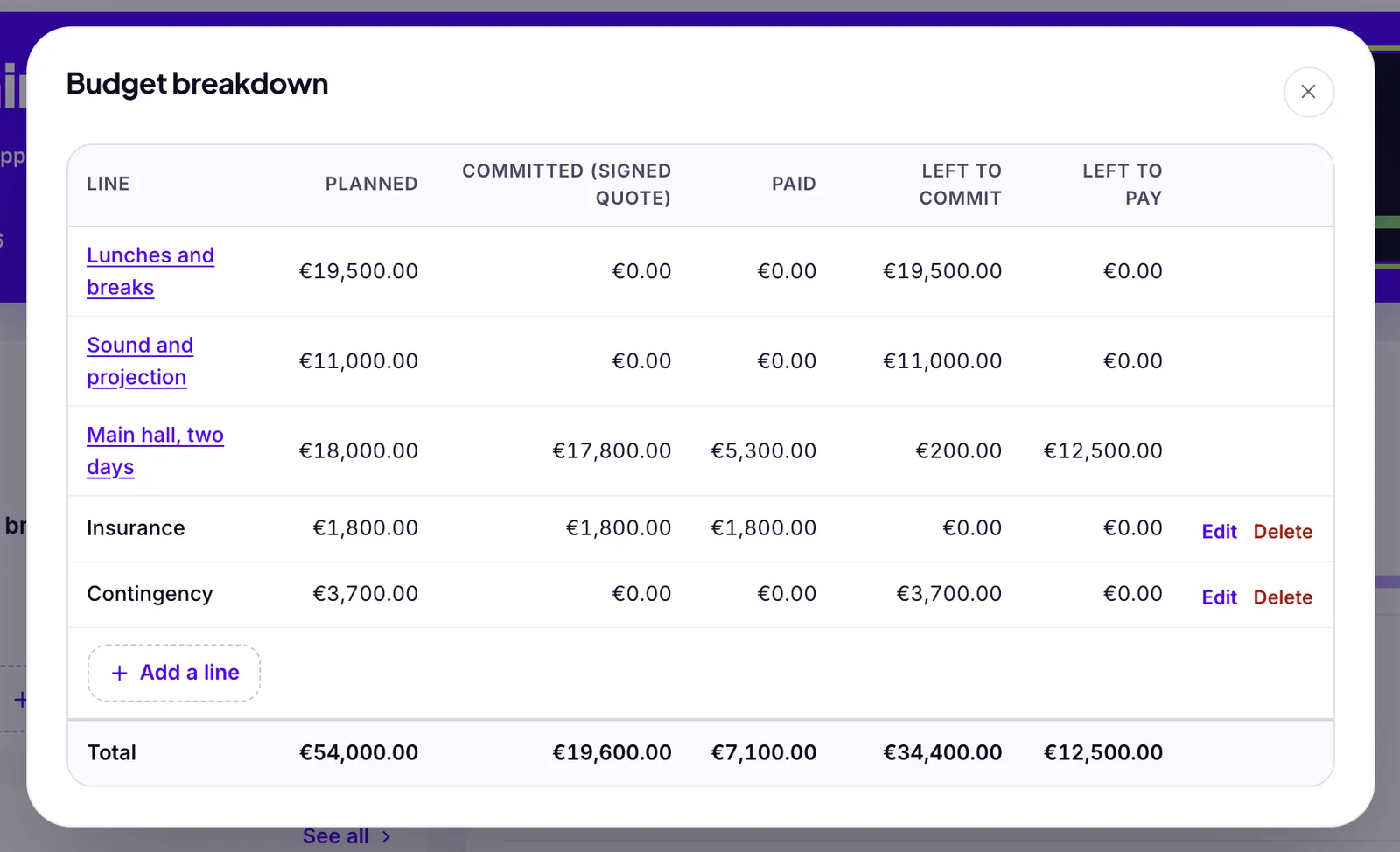
Squena applies this method today. Each event carries a planned budget, and “View breakdown” opens it line by line: Planned, Committed (signed quote), Paid, Left to commit and Left to pay — the columns of the template above. The alert fires before you sign, comparing the planned figure to what you would owe if you signed every pending quote. You can also set an optional budget per supplier need, sent to the supplier only if you check “State the planned budget” when you send the request. Paid stays a declaration: you mark a supplier as paid, or record a deposit, yourself. Squena does not read your bank account or match invoices one by one.
Frequently asked questions
What is committed spend on an event budget?
Committed spend is what you have promised to a supplier — a signed quote or a purchase order — even before any money has left your account. It is the figure that moves at the moment you decide, not weeks later when the invoice arrives.
What should an event budget template include?
A usable template tracks three states per line: planned (your estimate), committed (what you have signed) and paid (what has actually left). Two columns, planned and actual, hide the gap between signing a quote and paying its invoice, often four to eight weeks.
How much contingency should an event budget carry?
Between 5 and 10% depending on the format: nearer 5% for a conference in a venue you know, nearer 10% for an outdoor festival. What matters more than the figure is treating it as a real item with an owner, rather than a cushion nobody is watching.
Should an event budget template be tax-inclusive or tax-exclusive?
Either, as long as you decide and write it at the top of the template. Mixing the two is what produces a budget that drifts by a fifth in the UK without a single line being wrong, because suppliers quote one way and invoice another.
Which items get left off most event budget templates?
Premium hours on the get-in and get-out, overnight security, meals and lodging for crews, consumables, bank and platform fees on ticketing, making good afterwards, and specific insurance. None of them is large on its own. Together they are what eats a contingency line.
What is an event budget tracker, and how is it different from a budget template?
A budget template sets the plan, with one row per budget line, grouped by category, and three amounts: planned, committed and paid. An event budget tracker is what you keep updating after the quotes are signed, with one row per invoice or payment, its due date, its paid date and its receipt. The Expense log tab of the free Excel template on this page does that.
How do I track event expenses in a spreadsheet?
Give every invoice and every payment its own row: date, vendor, category, what for, invoice or purchase order number, amount, due date, paid date, payment method and whether the receipt is filed. Let a formula flag overdue rows and rows due soon, then compare what the log says was paid, category by category, with the Paid column of your budget sheet.
Sources
- VAT rates on goods and services — standard rate 20% — GOV.UK
- CEIR — research on exhibitions and business events — CEIR (IAEE)
- APEX Glossary — event-industry terms — Events Industry Council
- Pemberton Music Festival cancelled as organizers file for bankruptcy — Exclaim!
- What kind of records should I keep? Supporting business documents — Internal Revenue Service (US)
- How long should I keep records? Periods of limitations for income tax returns — Internal Revenue Service (US)