Production
Day of event schedule template: one page for the whole day
One page for the whole event day, from venue access to venue handover.
Alexis · Co-founder of Squena · September 30, 2026 · 10 min read
In short
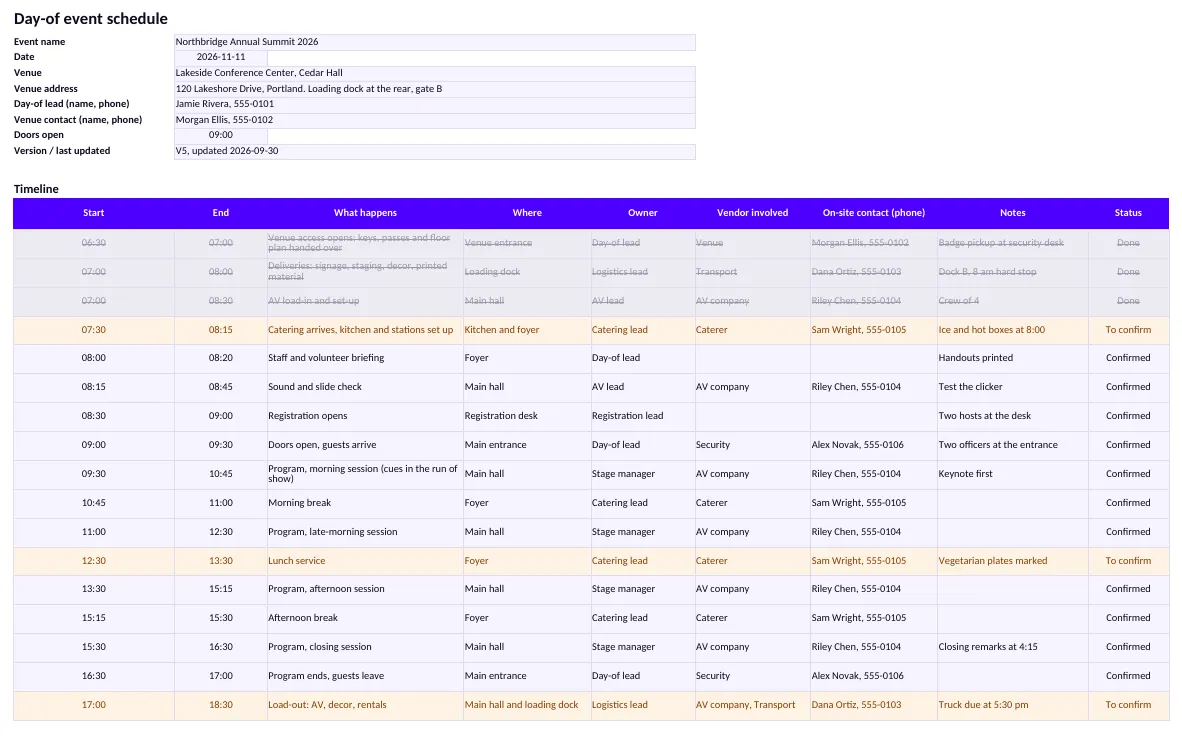
A day of event schedule is the one-page plan of the whole event day. It lists, in time order, venue access, deliveries, each vendor's arrival and load-in slot, the staff briefing, doors, the program blocks, breaks, load-out and venue handover, with a contact for each. It works only if every vendor's arrival is confirmed the day before, because one late truck moves everything after it.
A day-of schedule is one sheet you can print, hand to the team and check at 7 a.m. This page is written for professional events, such as conferences, seminars and trade shows. The organizer is the reader, not the guest.
Two other documents sit next to it. The run of show covers the program cue by cue. The production schedule covers the weeks before. The day-of schedule sits between them: it says who is where, and when, for everyone on site.
Generic templates show the gap. Smartsheet's event schedule template has columns for time, activity, location, assigned lead, and additional notes, and it keeps vendors in a separate template (page read on September 30, 2026). That suits a program of sessions. A day on site also needs to know which vendor arrives at which door, and when.
What goes on the one page
A day-of schedule is a timetable of the whole event, not of one stage. The closest document in the Events Industry Council's APEX guide is the Function Schedule: a timetable outlining all functions that compose the overall event. The guide dates from 2004 and 2005, and it is written for an organizer who briefs a venue and its suppliers. Its Function Schedule columns cover the day and date, the start and end times, the function name, the room and the room set-up. It also carries a revision date, so the reader knows which version is in hand.
For a professional event, one page usually needs the following blocks, in this order.
- Venue access: who opens the doors, at what time, and through which entrance.
- Deliveries: what arrives, from whom, and where it is received.
- Vendor arrivals and load-in slots: one line per vendor, with a set-up deadline.
- Staff briefing: who is briefed, by whom, and where.
- Registration and doors: when the desk opens and when guests come in.
- Program blocks: one line per block. The cue-by-cue detail lives in the run of show.
- Breaks and meal service: when the caterer serves, and where the queue forms.
- Load-out: the order in which vendors leave, and the time the venue must be empty.
- Venue handover: the walk-through, the keys, and who signs off.
- Key contacts: one role, one name, one phone number.
Keep the program to one line per block. If you copy the cue-by-cue script onto this page, the page stops being a page. Point to the run of show instead, and keep this sheet for the logistics around it.
Why arrivals decide the day
A program cannot start on time if something is not ready. When several contractors set up in the same venue, every vendor's arrival time is a dependency for the next one.
The UK's Health and Safety Executive makes a related point about safety. It says the need for safety management during build up, load-in, breakdown and load-out is just as important as during the public period. It also asks you to develop a safe, phased program of work that takes contractor risk assessments into account, and to communicate it to all relevant parties. A load-in slot list can carry the timing of that program, on one page. It does not replace the contractors' risk assessments that the program has to take into account.
Slots also save time. In 2017, the Metro Toronto Convention Centre and a logistics firm launched an app that let exhibitors pre-reserve a time for unloading. PCMA reported that each exhibitor saved around 20 minutes, instead of waiting in a marshalling yard. That is one venue, one event and one year. Read it as an example, not as a benchmark.
Confirm every arrival the day before
A booking made weeks ago is not a confirmed arrival. The day before, call or message each vendor and ask three things: what time do you arrive, at which load-in point, and who is on the truck with a working phone? Write the answers in the Vendor arrivals table. Set Confirmed? to No until you have heard back, and only then to Yes.
The template makes the check visible. Mark a vendor No until you have heard back: the row turns amber. A vendor whose Set up by time falls after doors turns red. You see the problem the day before, when a phone call can still fix it.
How to build it, block by block
Start from the end, as you would for a run of show. Write the moment the venue must be empty, then work backwards: load-out, the last program block, doors, set-up deadlines, and finally the first arrival. Each step gets the time it needs, not the time you wish it had.
| Block | What to write | What goes wrong without it |
|---|---|---|
| Venue access | Opening time, entrance, who holds the keys | The first vendor waits outside |
| Deliveries | What, from whom, received where and by whom | Boxes pile up at the wrong door |
| Load-in slots | Arrival, load-in point, set-up deadline, departure | Two trucks need the same dock |
| Staff briefing | Time, place, who leads it | People start work with different plans |
| Doors | Registration opens, doors open, first block starts | Guests queue while the desk is still being set up |
| Breaks and meals | Service start, place, dietary point of contact | The break overruns because the buffet is late |
| Load-out and handover | Order of departure, empty-by time, walk-through | A vendor is still packing when the venue closes |
Sort the timeline by start time and keep one owner per line. A line with two owners has none. Put the vendor's name in its own column, so the sheet can be filtered by vendor when a supplier asks what it needs to know.
Give the staff briefing a line of its own
Put the staff briefing on the timeline as a real line, with a time. HSE's guidance on incidents and emergencies asks organizers to make sure that all relevant staff members, whatever their normal role, understand what they should do in an emergency. For a show stop, it also asks for pre-agreed wording for public announcements. The briefing is where both get said out loud, once, to everyone.
Licensed hours are a fixed edge
In England and Wales, selling alcohol or offering some kinds of entertainment, such as live music, needs a license. To apply for a premises license, you provide an operating schedule, for example the hours when alcohol will be sold. A one-off event can run under a Temporary Event Notice instead. It must have fewer than 500 people at all times, including staff, and last no more than 168 hours. You must apply at least 10 clear working days before the event. Whatever your license says, write its end time on the schedule, so nobody plans past it.
Rules differ elsewhere. Check your own country's rules, and your venue's contract, before you fix the closing time.
Print it, date it, share it
Write a version number and a last-updated time at the top. When the schedule changes, reissue it and say what changed. The team reads the newest page, and the old ones go in the bin.
Give the full page to the day-of lead, the venue contact and the department leads. Give vendors their own lines and the key contacts. A crew member's personal call time and instructions belong in a separate call sheet. That is a different document, so it stays out of this one.
One limit is worth writing down. The template does not follow a day that crosses midnight, and it does not move later lines when an earlier one slips. It has no field for a license end time or an empty-by time either: write them as rows in the Timeline. You change the times by hand, and the version line tells everyone you did.
Where Squena fits
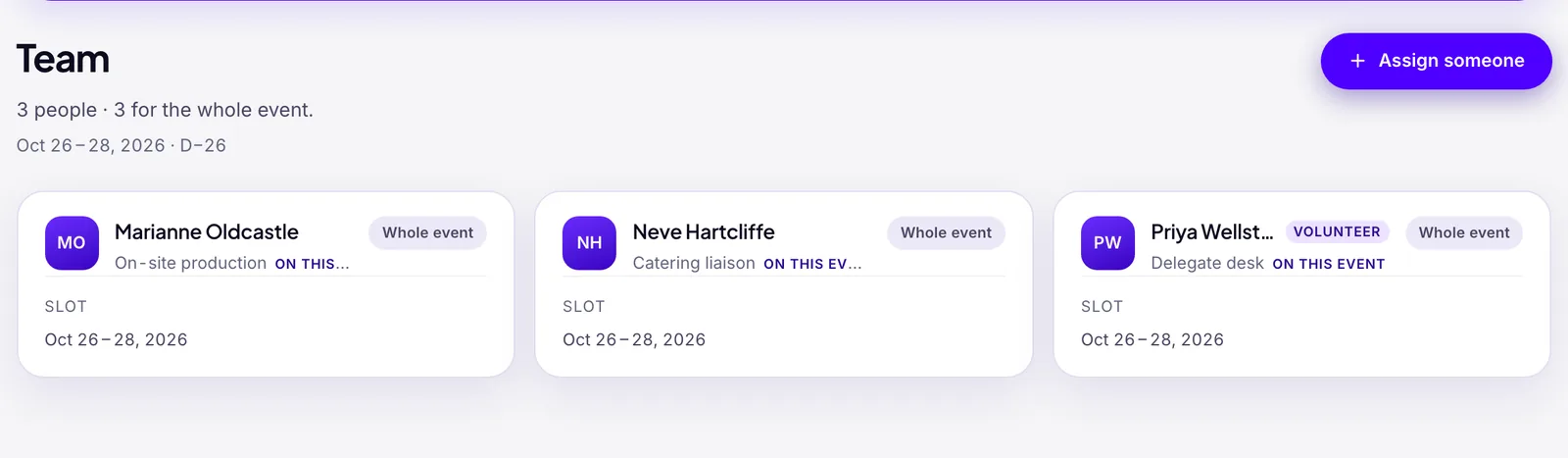
In Squena, a person assigned to an event is there for the whole event, unless you give them a slot: a start date and an end date of their own. A slot can run outside the event, for example a stage manager who does a recce the day before. Slots are dates, not times of day. Click a person on the team page and their phone number, if you entered one, is there to copy. Documents such as your filled-in schedule can be added under the event.
What Squena will not do: build the hour-by-hour plan for you, hold a time of day for each person, or chase a vendor about tomorrow's arrival. The schedule stays in your spreadsheet. Squena holds the team, their slots and the file.
Frequently asked questions
What is a day of event schedule?
It is the one-page plan of the whole event day. It lists venue access, deliveries, vendor arrivals, the staff briefing, doors, program blocks, breaks, load-out and venue handover in time order, each with an owner and a contact. It is read by the whole team.
What is the difference between a day of event schedule and a run of show?
A day of event schedule covers the logistics of the whole day for everyone on site. A run of show is narrower: the program itself, cue by cue, called by one person. The schedule points to the run of show for any detail on stage.
When should vendors confirm their arrival time?
Ask every vendor to confirm the day before the event: arrival time, load-in point and a mobile number for the person on the truck. A booking made weeks earlier is not a confirmation. Mark each line as confirmed only after you have heard back.
Is a day-of timeline the same as a production schedule?
No. A production schedule covers the weeks or months before the event, with tasks and deadlines. A day-of schedule covers a single day, hour by hour. A professional event needs both.
Who should get a copy of the day-of schedule?
Give the full page to the day-of lead, the venue contact and each department lead. Give each vendor its own lines plus the key contacts, not the whole plan. Date every version, so people know which one is current.
Sources
- Managing an event — safety across build up, load-in, breakdown and load-out — Health and Safety Executive (UK)
- Incidents and emergencies — staff briefing and public announcements — Health and Safety Executive (UK)
- Temporary Event Notice — fewer than 500 people, 168 hours — GOV.UK
- Premises licence — the operating schedule — GOV.UK
- APEX Event Specifications Guide — the Function Schedule (2004, 2005) — Events Industry Council
- How one convention center is making life easier for exhibitors (2017) — PCMA
- Free event planning templates — the event schedule template (read on September 30, 2026) — Smartsheet (template gallery, for context)